After installing SharePoint 2010 Beta, you may encounter “Missing Server Side Dependencies – 8d6034c4-a416-e535-281a-6b714894e1aa” error in SharePoint Cental Administration. It is a very weird error and there is no logical reason behind it:) Microsoft may fix it in the final release of SP2010. Until then here is the solution:
- Navigate to SharePoint Central Administration Page
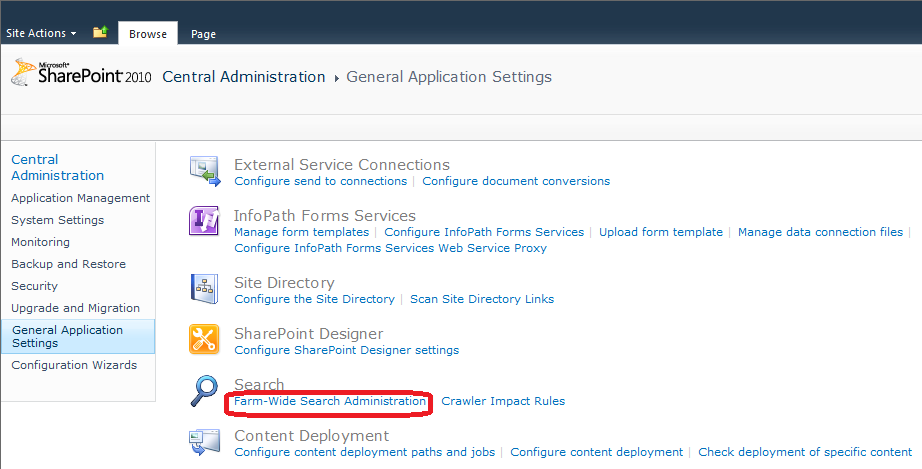
- Click General Application Settings on left hand side Quick Launch bar
- Under Search, click Farm-Wide Search Administration to open farm wide search administration page.
- Now, under Search Service Application click Search Service Application
- Now restart the server by executing iisreset -noforce command on command prompt.
- Thats it! You have solved the issue 🙂

To verify,
- Go back to SharePoint Central Administration Page and click on View these issue link, if it is available.
- You will notice that at least the above mentioned error has been removed.
If you want to know the background of this issue then please read this post


FYI It doesn’t appear to be fixed in the RTM. Or at least it wasn’t for me doing a Least Privledge based install…
Craig…did this solution work for you? I tried it this morning on our RTM and it is still throwing the error
Hey Jake,
it would appear to have fixed it…
I’m working through a Least Privledge based install (and can’t find decent documentation out there on how to do it), so I’m hitting fun little issues like this all the time.
I had the User Profile Sync stuff going, but now I see it’s failed again (Forefront Identity services wont start), so it’s back to the drawing board on that. I suspect it’s something to do with local admin rights for either the Farm Service Account(CA Content Pool, SQL Access account, what ever you want to call it) or the User Profile Service Account.
I’ve also got a /_controltemplates/TaxonomyPicker.ascx failed error to work through…
Such fun!
Hi Craig,
Ouch! I don’t feel so bad now about my issues. Best of luck to you! BTW. My issue did resolve itself. I was just a little anxious.
thanks for ur tutorial 🙂
Thanks! This resolved the issue for me on an RTM installation.
Thanks, this worked for me with SharePoint Server 2010 RTM!
This worked for our RTM installation too. Come on MS…roll this into an update. Thanks for the tip.
I like it when answer or to the point
this was easy and perfect instructions
Thank You 🙂
Thank´s, this work immediately..
Good article and wonderful analysis! I just bookmarked this page for a review later. Monogram Vernis
The whole article is so informative that I decide to mark it down for further analysis later. Burberry Prorsum Borse
I followed the steps for removing this error and the error is still present in my current “critical issues”. Has there been any other solutions or reasons why this would happen?
I was searching for something else when came across to yoru post and couldn’t resist to read it. You are a briliant writer and your blog will gain popularity each day!
I had to run iisreset without no force and i also restarted my timer service and then the error went away.
Hi.
Are you kidding me??
By click on what you say, only open a link going direct to the Search Service Administration site.
And, are you a MCITP SHP Certificate? My God! …
Thank you for help
Surprisingly, it actually works! I also restarted the Timer and SPS Search 14 Services. Many thanks to you!
I did the same but it does not resolve the issue.
hello namwar
your solution ist ok. Thanks a lot!!!